
11 Best AI Apps for iPhone in 2026: Top Picks for Every Need
Not every AI app deserves space on your iPhone. This guide covers 11 of the best AI tools, from chatbots and writing assistants to image editors and plant care apps. All are compared across features, pricing, and use cases.

On this page
- 1. Botan App
- Key Features:
- How to Use:
- Pricing:
- Best For:
- Pros:
- Cons:
- 2. ChatGPT
- Key Features:
- How to Use:
- Pricing:
- Best For:
- Pros:
- Cons:
- 3. Google Gemini
- Key Features:
- How to Use:
- Pricing:
- Best For:
- Pros:
- Cons:
- 4. NerdSip
- 5. Claude
- Key Features:
- How to Use:
- Pricing:
- Best For:
- Pros:
- Cons:
- 6. Microsoft Copilot
- Key Features:
- How to Use:
- Pricing:
- Best For:
- Pros:
- Cons:
- 7. Grok
- Key Features:
- How to Use:
- Pricing:
- Best For:
- Pros:
- Cons:
- 8. Grammarly
- Key Features:
- How to Use:
- Pricing:
- Best For:
- Pros:
- Cons:
- 9. Canva
- Key Features:
- How to Use:
- Pricing:
- Best For:
- Pros:
- Cons:
- 10. Picsart
- Key Features:
- How to Use:
- Pricing:
- Best For:
- Pros:
- Cons:
- 11. DeepL
- Key Features:
- How to Use:
- Pricing:
- Best For:
- Pros:
- Cons:
- Which AI App Is Best for You?
Modern AI tools cover a much wider range of tasks than just basic conversations and research. We’ve selected and reviewed the 11 best AI apps for iPhone, each highly functional and helpful in its own niche.
Read on to learn more about the best tools, from ChatGPT and Botan App to Grok and Canva, and choose the ones that will fit your workflow or can improve your daily routine.
App | Category | Best For | Key Feature | Pricing | Platform |
Plant Care AI | Houseplant owners, gardeners, nature explorers | Plant and disease identification, care guides | Free trial, 3 premium plans, costs start at ~$12 per month, lifetime access available | iOS, Android | |
General Assistant | General users, students, developers, professionals | Versatile general-purpose AI assistant | Can be used for free; 2 premium plans; costs start at $6.99 per month | iOS, Android | |
General Assistant | Google Workspace users | Gmail, Drive, and Calendar synchronization | Can be used for free; 3 premium plans; costs start at $4.99 per month | iOS, Android | |
AI Learning | Curious adults who want to learn something new every day | AI micro-courses on any topic, plus a voice tutor | Can be used for free; 1 premium plan; costs start at $7.99 per month ($49.99 per year) | iOS, Android | |
General Assistant | Writers, analysts, developers, researchers | Content writing, analysis, and coding assistance | Can be used for free; 2 premium plans; costs start at $25 per month | iOS, Android | |
Productivity AI | Microsoft 365 users | In-app Word, Excel, Outlook AI assistance | Can be used for free; 1 premium plan; costs start at $23.99 per month | iOS, Android | |
General Assistant | News followers, journalists, social media users | Live web and X search | Can be used for free; 3 premium plans; costs start at $40 per month | iOS, Android | |
Writing Assistant | Writers, professionals, non-native speakers | Cross-app writing suggestions | Can be used for free; 1 premium plan; costs start at $12 per month | iOS, Android | |
Design & Creativity Assistant | Content creators, marketers, students, small business owners | Professional design from templates | Can be used for free; 2 premium plans; costs start at $14.99 per month | iOS, Android | |
Photo & Video Editor | Photo editors, content creators | AI photo editing and generation | 3-day free trial, 2 premium plans, costs start at $4.99 per month | iOS, Android | |
Translation | Frequent translators, travelers, professionals | Natural-sounding text and document translation | Can be used for free; 1 premium plan; costs start at $10.49 per month | iOS, Android |
1. Botan App

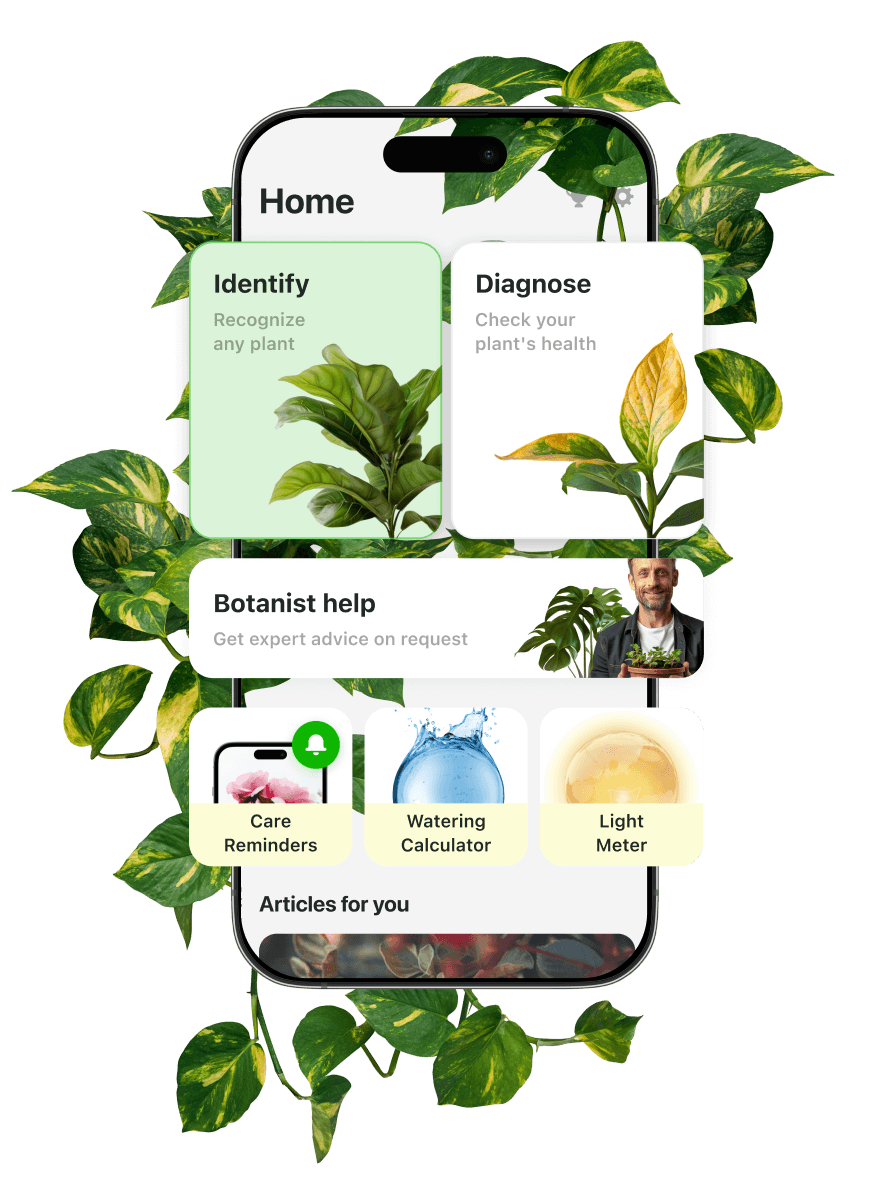
If you're browsing AI apps for iPhone outside the usual chatbot category, Botan App is worth a look. It lets you identify your houseplants in seconds, diagnose diseases, and set up care or recovery plans with a single tap.
The app is powered by a system that combines trusted botanical databases with specialized AI. The list of plants in Botan’s database covers 30,000+ species, including rare and exotic ones. The app offers a wide range of advanced tools, such as a Light Meter, Task Manager, virtual garden, and live Botanist chat.
Key Features:
- Automatic plant identification by photo (via camera or gallery)
- Automatic disease diagnosis with treatment and prevention guidance
- Personalized care reminders: watering, pruning, fertilization, repotting, and more
- Task manager, My Garden, History tracking
- AI Botanist chat for personalized expert recommendations
- Smart article suggestions based on your plant's specific issues
- On-blog plant selections (easy care plants, best evergreens, fast-growing species, etc.)
How to Use:
Open the app, point your camera at any plant, and tap to scan or upload a photo from your gallery. Get the instant ID result and click Set Up Care Plan if you’re going to grow it.
To identify the disease, take or upload 3 photos of damaged parts. Click Set Up Recovery Plan to get a step-by-step guide. Manage and customize reminders right in the Care or Recovery plan and access all tasks via the My Plants section.
Pricing:
- Free trial — 3 days, unlimited IDs and care plans
- Weekly plan — $11.00
- Quarterly plan — $35.99
- Lifetime access — $69.99
Best For:
Botan App suits beginners who want to properly care for their plants, experienced gardeners managing a larger collection, and anyone who regularly encounters plants they can't identify — in the garden, at home, or out in the wild.
Pros:
- Accurate and detailed ID results
- Helpful and clear care plans
- Reminders make it easy to stick to the care schedule
- Botanist chat helps resolve non-standard issues with plants
Cons:
- Short free trial, automatic charges after it ends
- No forum, feed, or other ways to exchange opinions with users
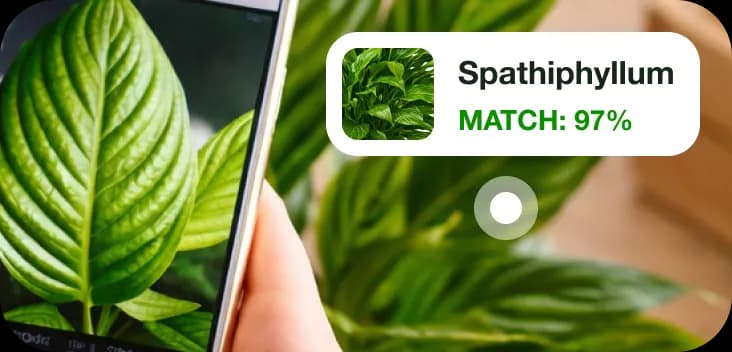
Identify Your Plant
Scan the plant and get a result with 98% accuracy
2. ChatGPT

31% of Americans now interact with generative AI at least several times a day. For most, that means ChatGPT. This conversational chatbot is considered the best AI for iPhone for those who need a single app for conversations, brainstorming, writing, research, coding, image generation, and task automation.
Key Features:
- Writing, research, coding, and file analysis
- Image generation
- Advanced Voice Mode
- Deep Research
- Photo upload
- Memory that retains context and preferences
- Agent Mode for autonomous multi-step task completion
- History synchronization across all devices
How to Use:
Download the app, create a free account, and type or speak your request. For recurring tasks, enable memory so ChatGPT builds context about how you work over time.
Pricing:
- Free — unlimited conversations but limited model access
- Go — $6.99 per month
- Plus — $22.99 per month
Best For:
Anyone who wants one app that covers most everyday tasks: writing, research, answering questions, generating images, or automating repetitive tasks.
Pros:
- Time saver, good for daily research and writing tasks
- Best value for money among paid AI subscriptions
- Natural dialogue style
Cons:
- Often gives inaccurate answers
- Response quality can shift unexpectedly after model updates
3. Google Gemini

Among the free AI apps for iPhone on this list, Gemini has one of the strongest no-cost tiers. If you already use Gmail, Google Docs, or Drive daily, it's also the most practical.
Gemini connects directly to your Google account, works as a personal assistant across your apps, and can search your emails, pull from Drive files, and create Calendar events.
Key Features:
- Real-time voice conversation
- Image generation with Imagen 4
- Video generation (Veo 3)
- Deep Research
- NotebookLM integration
- Canvas for building web pages, documents, and dashboards
- Google Workspace integration
- Custom quiz generation from uploaded notes
- Custom music generation
How to Use:
Download the app and sign in with your Google account. Type or speak your request, or use Gemini Live to have a real-time voice conversation with camera access.
You can also connect your Google apps in settings so Gemini can search your emails, access your Drive files, and update your Calendar directly.
Pricing:
- Free — basic access, daily usage limits
- AI Plus — $4.99 monthly, $49.99 with an annual plan
- AI Pro — $19.99 per month, $199.99 with an annual plan
- AI Ultra — $99.99 per month (monthly billing only)
Best For:
Google Workspace users who want their AI assistant to work directly inside the tools they already use every day. Google also offers a full year of AI Pro at no cost to eligible college students in several countries.
Pros:
- Great for summarizing emails, analyzing documents, and pulling YouTube content
- Image generation quality stands out, including photo editing capabilities
- Makes daily work noticeably faster
Cons:
- Occasional hallucinations and factual errors
- Context loss in longer conversations
4. NerdSip

NerdSip works like a dating app, but for knowledge. Its algorithm serves a feed of bite-size courses: swipe right on what sparks your curiosity, left on what doesn't, and the feed gets sharper with every swipe. Can't find a topic? Type it in and the AI course generator builds a full course in seconds, with images, mini-games and quizzes. It's an easy way to swap a few minutes of scrolling for a few minutes of learning.
Key Features:
- A personal feed that learns from every swipe
- AI course generator for any topic, in seconds
- Different interactive quizzes and mini-games in every lesson
- A voice tutor you can talk to about any course
- Courses in English, German, Spanish and Portuguese
- A four-step fact-checking engine
- Spaced repetition reviews, so what you learn actually sticks
How to Use: Download the app, pick a few interests and start a course from your feed, or type in your own topic. To ask a follow-up question, tap the mic button inside any course and talk to the voice tutor.
Pricing:
- Free — basic access, a limited number of new courses per day
- Gold — $7.99 per month, $49.99 with an annual plan (7-day free trial)
Best For: Curious adults who want to learn something new every day, and anyone who wants a quick, clear intro to a topic without reading ten articles.
Pros:
- Works for any topic, not just a fixed library
- Lessons short enough for a coffee break
- Game features help you build a smart habit
Cons:
- The free plan limits how many courses you can start each day
- AI-written courses can vary in depth from topic to topic
5. Claude

Claude is an advanced chatbot built for writing, analysis, coding, and working through complex documents. Among AI iOS apps, it handles longer, more detailed tasks better than most. Its context window goes up to a million tokens.
Key Features:
- Writing, analysis, coding, and document processing
- Memory across conversations
- Projects (self-contained workspaces)
- Artifacts (outputs, such as code snippets, documents, or designs in a side panel)
- Web search on all tiers
- Extended thinking mode
- Multiple models: Haiku 4.5 (fast), Sonnet 4.6 (everyday), Opus 4.8 (highest reasoning)
How to Use:
Download the app and sign in or create a free account. Type your request with detailed context and wait for the response. For long documents, upload the file directly and ask specific questions about it.
Pricing:
- Free — comes with tight daily usage limits
- Pro — $25 monthly, $249.99 annually
- Max — $149.99 or $299.99 monthly
Best For:
Writers, analysts, developers, and anyone who works with long or complex documents and needs an AI that follows instructions without losing the thread.
Pros:
- Strong at coding and long document analysis
- Follows complex instructions
- Writing output feels less robotic
Cons:
- Pro usage limits run out very fast
- Hallucinates like any other AI, skips some of the instructions
- No image generation
6. Microsoft Copilot

Studies show that AI assistance produces around a 14% increase in workplace productivity, and Copilot is built specifically around that idea. The tool works as an additional layer within Microsoft 365 rather than a standalone tool.
It drafts documents, rewrites emails, summarizes meetings in Teams, and analyzes spreadsheets directly inside Word, Excel, and PowerPoint.
Key Features:
- Email drafting and summarization in Outlook
- Meeting summaries and action items in Teams
- Document drafting and analysis in Word
- Data analysis and formula generation in Excel
- Web search and real-time information
- Image generation
- File upload and analysis
- Multi-step task automation
- Memory across conversations
How to Use:
Download the free app and sign in with a Microsoft account. For basic chat, the free tier works immediately. To use Copilot inside Word, Excel, or Outlook, you need a Microsoft 365 subscription.
Just open any Office app, look for the Copilot icon, and type your request directly in the document or email you're working on.
Pricing:
- Free — basic Copilot Chat, no Office app integration
- Premium — $23.99 per month for 1-6 people (1-month free trial is offered)
Best For:
People who work in Microsoft 365 daily and write documents, manage email, or sit through a lot of meetings.
Pros:
- Saves time by drafting content and summarizing documents
- Seamless ecosystem integration
- Fast first drafts
Cons:
- Weak conversational memory
- Forced integration
- Occasionally invalid files or incorrect outputs in Excel
7. Grok

Grok is also a chatbot assistant, but unlike most AI tools, it pulls from X (Twitter) and the live web in real time. That makes it genuinely useful for anything time-sensitive, such as breaking news, trending topics, market moves, and social sentiment. It's also less filtered and has a more direct tone.
Key Features:
- Real-time web and X (Twitter) data access
- DeepSearch
- Big Brain mode
- Grok Vision (camera-based visual recognition)
- Voice Mode
- Image and video generation
- Document uploads and analysis
- Automation through multi-agent workflows (SuperGrok Heavy)
How to Use:
Download the app and sign in. Type or speak your question for an immediate answer sourced from the live web or specifically X. For deeper research, switch to DeepSearch mode. Point your camera at any object with Grok Vision and ask a question aloud for a real-time response.
Pricing:
- Free — limited usage, no image generation
- Super Grok — $40 monthly, $400 yearly
- Plus Grok — $119 monthly, $1,000 yearly
- Heavy Grok — $400 monthly
Best For:
Journalists, researchers, traders, and anyone tracking fast-moving topics, as well as for those who need current information rather than answers based on training data.
Pros:
- Fast research that surfaces unexpected relevant information
- Retains context well across conversations
- Unfiltered tone compared to other AI tools
Cons:
- Image generation cut significantly after a recent update
- Frequent server errors on free tier
8. Grammarly

If you’d like to improve your spelling and grammar, Grammarly will be the best choice. It’s a writing assistant with full iOS integration that sits inside every app you already use through a custom keyboard. Whether you're writing an email, a text, or a document, it catches grammar and spelling mistakes in real time and suggests clearer alternatives.
Key Features:
- Grammar, spelling, punctuation, and clarity suggestions in 20+ languages
- AI rewrites (improved versions of your text)
- Voice dictation with automatic cleanup
- Tone detection and tone transformation
- Smart formatting completions
- Plagiarism and AI-generated text detection
- Document editor with cloud storage
How to Use:
Download the app and set Grammarly as your iPhone keyboard in Settings. It will work automatically in every app. Suggestions will appear above the keyboard as you type.
Pricing:
- Free — basic grammar and spelling
- Pro — $139.99/year ($11.67 per month) or $29.99 per month
Best For:
Non-native speakers and anyone who writes emails, messages, and documents regularly on their iPhone and wants suggestions that go beyond autocorrect.
Pros:
- Life-changing for people who always struggled with grammar and spelling
- Used daily across every device and app
- Shows real vocabulary progress compared to other users
Cons:
- Free tier constantly hits usage limits
- Can break temporarily after an update
9. Canva

If you’re more into design, consider Canva — one of the most capable creativity platforms. In 2026, it covers graphic design, photo editing, video creation, and image generation in one app. You can generate a social media post from a text prompt, remove backgrounds in one tap, auto-resize designs for different platforms, or let AI stitch your clips into a finished video.
Key Features:
- Image and video generation from text
- Magic Video
- Magic Layers
- One-click background removal
- Magic Resize
- AI Post Writer
- Thousands of templates
- Photo editor
- Real-time collaboration
How to Use:
Download the app and browse templates or start from a blank canvas. For AI-generated content, tap the Magic Studio icon and describe what you want. For video, drop your clips into Magic Video and let AI assemble them. For photo editing, import from your camera roll and use the toolbar to edit, remove backgrounds, or add elements.
Pricing:
- Free — limited templates and AI credits per month
- Pro — $14.99 per month or $119.99/year
- Business — $21 per month
Best For:
Content creators, students, small-business owners, and anyone who regularly needs to produce polished visuals. Particularly useful for social media content, presentations, and marketing materials.
Pros:
- Enjoyable creative process regardless of skill level
- Professional-looking results
- A lot of useful features for amateurs and professionals
Cons:
- Video editing is pixelated and laggy (audio and video often go out of sync)
- App crashes frequently during video editing
10. Picsart

Picsart is closer to a photo and video-editing tool. It covers image generation, background and object removal, AI video creation, face enhancement, collage making, and access to multiple AI models including Veo, Kling, and Runway. It also has a built-in community where users share their creations.
Key Features:
- Image generation from text prompts
- Background and object removal
- AI video creation
- AI avatars and headshots
- Face detection and enhancement tools
- Filters, effects, and stickers
- Collage maker
- Templates for social posts, business cards, logos
- Picsart Aura (conversational AI creative partner)
- Community features
How to Use:
Download the app, sign up or log in, and import a photo from your camera roll or start with a template. For image generation, tap the AI tools menu and describe what you want. To remove background, open any photo and tap Remove Background. For AI video, use Gen AI Studio to select a model and generate from a prompt or existing image.
Pricing:
- 3-day free trial
- Plus — $4.99 monthly, $69.99 annually
- Pro — $6.49 monthly, $38.99 yearly
Best For:
Content creators and social media users who need a capable mobile photo and video editor with built-in AI tools.
Pros:
- AI photo editing is consistent
- The tool sharpens images without compromising quality
- Enormous range of tools, new features added every month
Cons:
- App crashes during video editing and doesn't always save work
- Customer service consistently unhelpful
- AI generation often ignores specific prompt instructions
11. DeepL

Standard chatbot can handle translation, but DeepL will handle it better. This is an AI-powered translation tool, and unlike many other apps, it produces results that native speakers actually find accurate. It covers text, documents, camera-scanned text, and voice input. In 2026, it can entirely replace Apple's default translation app on iPhone.
Key Features:
- Text translation across 31+ languages
- Camera translation
- Voice translation for real-time conversations
- Document translation (PDF, Word, PowerPoint)
- DeepL Write (grammar and writing improvement tool)
- Alternative word and phrase suggestions
How to Use:
Download the app and type, paste, or speak your text. To set DeepL as your default translation app, go to iPhone Settings, find DeepL, and enable it as the default.
Pricing:
- Free — limited characters per translation
- Premium — $10.49 monthly, $104.99 annually
Best For:
Anyone who regularly translates between languages for work, travel, or daily communication.
Pros:
- Recommended by native speakers over other translation apps
- Verified accurate by German and Portuguese speakers
- Translations sound natural rather than mechanical
Cons:
- Voice playback sounds robotic
- Free version is restrictive, pushes toward a paid plan quickly
Which AI App Is Best for You?
If you want to choose the best AI for your iPhone, ask yourself a few simple questions:
- What do you use your phone for most?
- Do you need general assistance or a specialized tool?
- With which apps and programs (Office, Google, etc.) do you work most frequently?
- What is your priority: research or conversation?
- Do you need help with specific tasks like plant care?
- Do you code, write, or edit regularly?
- Are you more on the visual design side?
If you want a general-purpose assistant that handles writing, research, coding, and everyday questions, ChatGPT, Claude, or Gemini will cover most of your needs.

For more specific needs, the choice gets easier. With the Botan App, you can easily handle plant ID and care with advanced science- and AI-supported plant care guides and recovery plans.
Perplexity is the one to reach for when you need sourced, current information. Grok is strongest for breaking news and social trends. DeepL is the only app on this list built specifically for translation.
Grammarly works best for anyone who writes frequently on their phone. If you work primarily within Microsoft 365, Copilot is the most practical choice.
On the creative side, Canva and Picsart serve different workflows. Canva is best for design, presentations, and social content, while Picsart is a top choice for photo editing and image tools.

Want to keep your plants healthy with ease?
Take a photo & get a detailed care plan in seconds
FAQ
It depends on what you expect from it. ChatGPT is the most versatile for general use. Claude and Perplexity are stronger for writing and research. Gemini and Copilot are best for Google or Microsoft ecosystems. Botan App leads for plant identification and care, DeepL for translation, and Grammarly for writing assistance.
Alex Yar
Plant Expert
7+ years of experience studying plants, researching their diseases, and examining their characteristics.
Alex is a plant expert and writer with more than 7 years of experience studying plants, their growing requirements, and their responses to environmental conditions. His areas of expertise include plant care, disease recognition, stress diagnosis, pest-related problems, and the distinctive characteristics of different species.
Over the years, Alex has developed a strong practical understanding of how light, temperature, humidity, watering, soil conditions, and nutrition affect plant health. He combines careful observation with in-depth research to explain effective care and recovery methods.
Alex has extensive hands-on experience caring for houseplants. His articles translate complex botanical topics into clear guidance that helps you better understand your plants and recognize early warning signs.
Related Articles

7 min read · 29 Oct 2026
10 Best Nature Apps for Identifying Plants, Birds, and More
Nature apps can name a plant, a bird, a star, or a mountain peak while you walk. Here are 10 options, sorted by category, plus prices, platforms, and tips for choosing the right application.

6 min read · 21 Oct 2026
Best Plant Watering App: 7 Apps for Reminders and Schedules
Discover 7 top apps for watering reminders. Learn what each offers, compare watering features, plus additional care features and costs. Get extra tips to choose the right tool for your specific needs.

7 min read · 24 Sept 2026
AI Gardening: 7 Best AI Apps for Plant Care and Garden Planning
AI gardening apps can identify plants, detect possible diseases, give care plans, and help you test garden layouts. This guide compares seven useful tools for different plants, spaces, and gardening goals.
Explore Plants by Care Needs
 POPULAR
Creeping Primrose-willow
Ludwigia repens
 POPULAR
Moses-in-the-cradle
Tradescantia spathacea
 POPULAR
Watermelon Pilea
Pilea cadierei
 POPULAR
shingles plant
Monstera dubia
 POPULAR
Bristle Haworthia
Haworthia cooperi
 POPULAR
Moon Cactus
Gymnocalycium mihanovichii
 POPULAR
String of Buttons
Crassula perforata
 POPULAR
Begonia amphioxus
Begonia amphioxus
Identify the plant and problem. Help your plant recover
Identify plant problems early, understand what's wrong, and get clear care guidance. Botan helps you turn guesswork into confident plant care